
Color Flash Light1.2 - Google Play
You'll be able to see results in few seconds.
Publisher Description

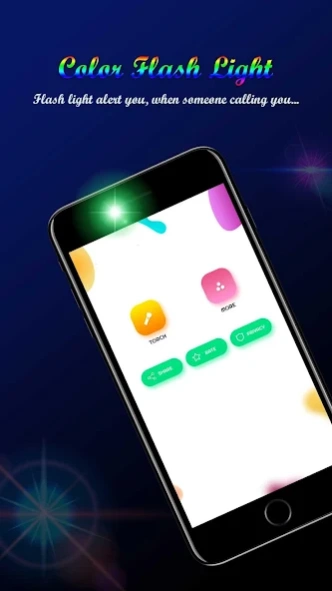

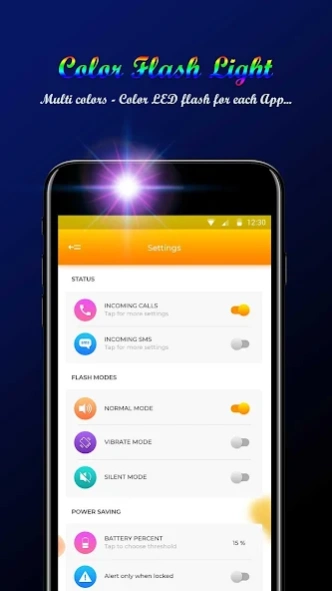
This application has torch, Color Flash Light and also the SOS light available
Color Flash Light Application has Screen Light, Camera LED flashlight and also the SOS flashlight available.
In this application Camera LED flashlight used in any dark place, other needs on the night time, or some hidden corner,
The Screen Light used in the Screen Brightness and most effective part of this application is the SOS flashlight.
The SOS flashlight works like pop-light that used in any concert-night or in the disco clubs to enjoy the party or events that make your life colorful. So the SOS flashlight app is used to any type of person nowadays.
All the Time you will have a use for a flashlight in your pocket.
The SOS light has some fixed code that you blink Light automatic. The SOS Light mostly used in the night events, music concerts, or the Light event shows. In the night event show, the maker creates some fix light pop up when the middle of the event that makes the event unique and different. It also used in the concert night by the singer fans to show the love for singer songs and also motivated the singer's performance and enjoy the night event with SOS Flash Light. That SOS Flash Light makes each and every small event different and enjoyed by the people.
This Color Flash Light application gives a user to cool custom effects to enjoy the lights in all type of situation.
* Key Features of this Color Flash Light Color screen application
- Start and Stop buttons Available to on and off the Camera LED light, SOS flash Light, and screen Light.
- Change the color of when the user wants to change.
- A birthday party, College party , Anniversary and some other Night party we used the SOS Flash Light.
- The Camera LED flashlight is also used as the first-aid in a night accident.
- The SOS Flash Light cover the selected area with the focus light.
- Screen brightness mode is used for reading something or if you want the more brightness on your screen.
* Effects on Camera Flash Light
- The Normal Flash Light.
- The Screen Light (brightness controller) to Read Something.
- SOS Flash Light for the blink of the light mode.
- Set the code for the blinking light at the developer side so the user uses this function perfectly.
* With this Application, you can do.
- Read the real book in the dark .
-Find the Small-things that lost in the nights.
-Turn on the flashlight when the electricity cut-off at home time.
- you need to read something or somewhere exasperate you shine a bright light on-camera LED flashlight use Screen Brightness mode. Regular light from the screen is nicer than the light from the camera flashlight. If you want to read books at night has never been easier and more comfortable. Easy night reading with our great functionality screen brightness.
-You can also repair your car or change the puppet.
- The performance of the Flash Light is to click the photos in the night or the dark place.
- you can Fun with your friends make blinking the environment around you with a muscly disco strobe flashlight.
Use of the Application we have used the Mobile Flash Light in so many ways or in a different type of environment that users want.
*Darkness cannot drive out darkness; only light can do that. Hate cannot drive out hate; only love can do that. *
About Color Flash Light
The company that develops Color Flash Light is AB IT Solutions. The latest version released by its developer is 1.2.
To install Color Flash Light on your Android device, just click the green Continue To App button above to start the installation process. The app is listed on our website since 2019-11-12 and was downloaded 0 times. We have already checked if the download link is safe, however for your own protection we recommend that you scan the downloaded app with your antivirus. Your antivirus may detect the Color Flash Light as malware as malware if the download link to com.colorflashlight is broken.
How to install Color Flash Light on your Android device:
- Click on the Continue To App button on our website. This will redirect you to Google Play.
- Once the Color Flash Light is shown in the Google Play listing of your Android device, you can start its download and installation. Tap on the Install button located below the search bar and to the right of the app icon.
- A pop-up window with the permissions required by Color Flash Light will be shown. Click on Accept to continue the process.
- Color Flash Light will be downloaded onto your device, displaying a progress. Once the download completes, the installation will start and you'll get a notification after the installation is finished.
Program Details
System requirements
Download information
Pricing
Version History
version 1.2
posted on 2019-11-12
-Start the SOS light (on/off) buttons.
-Turn off the flashlight when your mobile battery was low.
1.Normal mode
2.Vibrate mode
3.Silent mode
Disclaimer
Official Google Play Link
We do not host Color Flash Light on our servers. We did not scan it for viruses, adware, spyware or other type of malware. This app is hosted by Google and passed their terms and conditions to be listed there. We recommend caution when installing it.
The Google Play link for Color Flash Light is provided to you by apps112.com without any warranties, representations or guarantees of any kind, so access it at your own risk.
If you have questions regarding this particular app contact the publisher directly. For questions about the functionalities of apps112.com contact us.
